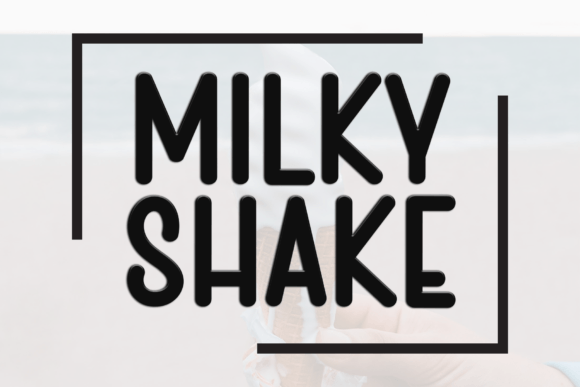
Introducing Milky Shake: A Font That Enhances Your Creative Workflow
Milky Shake is more than just a font—it’s a design element that brings warmth, personality, and a sense of calm to any project. With its fluid strokes and organic lines, this typeface evokes a laid-back yet elegant aesthetic that fits seamlessly into both digital and print environments. Whether you're working on branding materials, social media graphics, or personal creative projects, Milky Shake offers a fresh and inviting visual identity.
The Role of Typography in Design Workflows
In the world of design, typography plays a crucial role in shaping the overall experience of a project. It's not just about readability—it's about conveying tone, emotion, and brand personality. Milky Shake, with its soft curves and approachable style, can be an excellent choice for designers looking to add a touch of modernity without sacrificing readability.
When considering how to integrate fonts like Milky Shake into your workflow, it's important to think about the stages of a project. From initial concept to final execution, typography should support each phase. For instance, during the planning stage, choosing a font that aligns with your brand voice can help maintain consistency throughout the entire process.
Where Does Milky Shake Fit In?
Milky Shake is versatile enough to work across multiple stages of a design project. It can be used as a primary font for headings, subheadings, or even body text, depending on the context. Its clean yet casual appearance makes it ideal for a variety of applications, from website headers to event invitations and promotional materials.
For professionals involved in branding, Milky Shake can serve as a signature font that reflects a company's values—freshness, approachability, and creativity. Marketers and educators may find it particularly useful when creating content that needs to be both engaging and easy to read.
Practical Use Cases for Milky Shake
Let’s explore some real-world scenarios where Milky Shake can make a meaningful impact:
- Branding Projects: Use Milky Shake for logo designs, packaging, and marketing collateral to create a cohesive visual identity.
- Social Media Graphics: This font works well for Instagram posts, Twitter banners, and Facebook ads due to its modern yet friendly feel.
- Invitations and Event Materials: Milky Shake adds a personal touch to wedding invites, workshop announcements, and community events.
- Personal Blogs and Websites: Incorporate it into your site’s design to give your content a more polished and professional look.
By selecting the right font at the right time, you can enhance the user experience and make your content more memorable.
How to Integrate Milky Shake Into Your Workflow
Integrating Milky Shake into your design process requires thoughtful planning and consideration of several factors:
- Font Compatibility: Ensure that Milky Shake works well with the platforms and tools you use. Test it across different mediums, including web, print, and mobile apps.
- Consistency: Maintain a consistent font usage across all design assets to reinforce brand recognition and professionalism.
- Accessibility: Always check that the font is readable at various sizes and on different backgrounds to ensure inclusivity.
- Organization: Keep track of your font choices and their applications to avoid confusion and streamline future projects.
By following these steps, you can ensure that Milky Shake becomes a reliable part of your design toolkit rather than an afterthought.
Working With Other Tools and Resources
Milky Shake doesn't exist in isolation—it interacts with other tools, resources, and platforms to enhance your workflow. When using design software like Adobe Illustrator or Canva, you can easily import and customize Milky Shake to suit your project’s needs.
For those who rely on online platforms for collaboration, consider how Milky Shake integrates with tools such as Figma, Google Docs, or Notion. These platforms allow for seamless font customization and team collaboration, making it easier to maintain consistency across multiple projects.
Additionally, pairing Milky Shake with complementary fonts can help create visual hierarchy and balance. For example, using a bold sans-serif font for headlines while keeping body text in Milky Shake can improve readability and aesthetics.
Workflow Examples
Here are a few examples of how Milky Shake can be incorporated into different workflows:
- Marketing Campaign: Start by selecting Milky Shake for all promotional materials. Use it for email subject lines, social media posts, and website headers to maintain a unified look.
- Content Creation: When writing blog posts or articles, use Milky Shake for titles and pull quotes to draw attention and break up text.
- Event Planning: Apply Milky Shake to event invitations, signage, and program guides to create a welcoming and stylish atmosphere.
Each of these examples demonstrates how Milky Shake can be adapted to fit specific tasks and goals, making it a valuable asset in your creative arsenal.
Long-Term Use and Quality Control
As with any design tool, the long-term use of Milky Shake requires ongoing evaluation and refinement. Regularly assess how the font performs in different contexts and update your choices as needed.
Quality control is also essential. Ensure that Milky Shake remains legible across all formats and devices. If you notice any issues with rendering or clarity, consider alternative fonts or adjustments to your design setup.
Finally, keep your font library organized so that you can quickly access and apply Milky Shake whenever it’s most appropriate for a project.
Conclusion
Milky Shake is a font that brings a unique blend of freshness and elegance to your design work. By understanding its strengths and limitations, you can effectively incorporate it into your workflow and elevate the quality of your projects. Whether you're a designer, marketer, educator, or hobbyist, Milky Shake has the potential to enhance your creative output and make your work stand out.